April 8, 2026 · 6 min read
Stop Prompting. Start Engineering.
Most developers use AI coding tools the way they use a search engine. Boris Cherny’s framework replaces that guesswork with environment design, context isolation, and automated verification.
AI · Claude Code · Developer Tools · Agentic AI
Most people still use AI coding tools the way they use a search box: type a request, hit Enter, and hope something useful comes back. Boris Cherny has a blunt name for that habit: “prompt and pray.” His system starts from a different idea. Instead of relying on luck, you build the conditions that make good results more likely: a clear plan, clean memory, isolated context, and a feedback loop that catches mistakes before they become yours.
What follows is a walkthrough of that system in twelve sketches. Each one explains a different part of the same larger shift, from casually prompting a model to deliberately engineering the environment around it. Read together, they point to one simple conclusion: the AI may write the code, but you are the one designing the machine.
The Core Idea
This image captures the central shift in Boris Cherny’s approach to AI: moving from “prompt and pray” to designing a system the model can work inside. Instead of tossing a vague request at AI and hoping it lands somewhere useful, the goal is to create the right conditions upfront through planning, structure, and clear feedback. Strong results do not come from finding magical prompt words. They come from building an environment where good output is the expected outcome, not a lucky accident.
The Four Differences Between Typical AI Coding and the Boris System
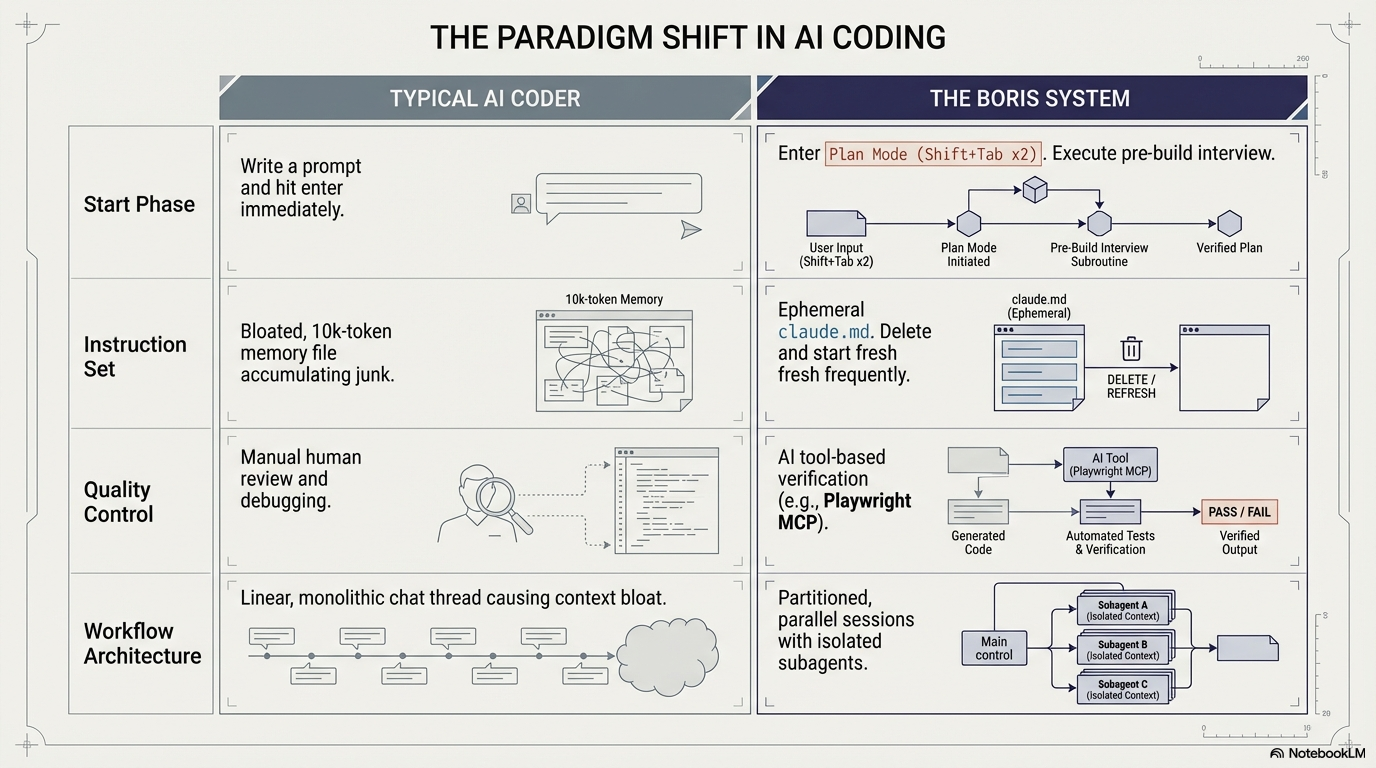
Most people think the breakthrough in AI coding is better prompting. Boris’s system argues that the real breakthrough is better orchestration.
That difference shows up immediately at the start. In the typical workflow, the user writes a prompt, hits Enter, and lets the model run. Boris does the opposite. He starts in Plan Mode, uses a short pre-build interview to expose weak assumptions, and does not let the AI write code until the plan is clear. The goal is not to slow the process down for its own sake. It is to make sure the model is solving the right problem before it starts generating the wrong solution at high speed.
The second difference is the instruction layer. For most users, claude.md quietly turns into a junk drawer stuffed with old rules, repeated reminders, and leftover preferences from past sessions. Boris treats it as disposable. Keep it short. Trim it often. Delete it when it becomes bloated. Start fresh when needed. That sounds counterintuitive, but the logic is simple: once the instruction file becomes crowded, it stops helping the model focus and starts making it drift.
The third difference is quality control. In the standard setup, the human is still the cleanup crew, checking the output by hand, catching mistakes late, and debugging whatever the model misunderstood. Boris pushes verification into the workflow itself. He gives the model tools to inspect what it built, test it, and confirm whether it actually works. In the version shown here, that means tool-based verification through Playwright MCP. The result is a subtle but important shift: the human is no longer the only guardrail standing between “done” and “actually correct.”
The final difference is architectural. Most people stay inside one long chat thread, dragging every prompt, mistake, and revision forward until the context becomes heavy and noisy. Boris breaks work into partitioned sessions with isolated subagents, each carrying only the context needed for one task. That keeps each thread cleaner, sharper, and less likely to wander. Put together, these four shifts amount to more than workflow advice. They point to a different way of working with AI altogether: less prompting for miracles, more designing for reliable outcomes.
Strategic Friction: Why the Hard Part Should Come First
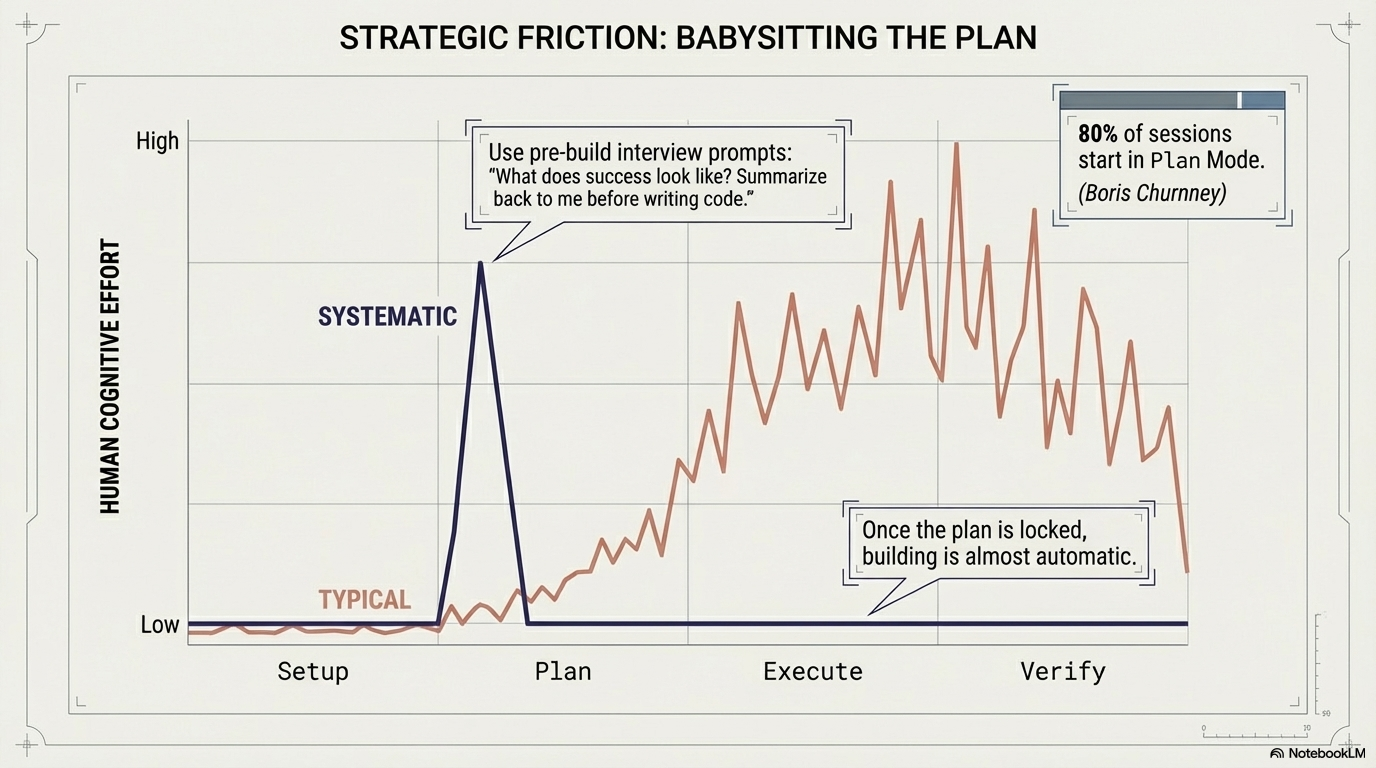
There is an old military saying that fits this chart well: the more you sweat in peace, the less you bleed in war. That is exactly what Boris Cherny is doing with AI. Most users try to move fast by skipping the planning step. They type a prompt, hit Enter, and let the model start building right away. It feels quick in the moment, but that early speed is misleading. The real cost shows up later, when the output drifts, the assumptions are wrong, and the human has to step in to debug, rewrite, and clean up the mess.
The systematic approach looks slower only at the beginning. In the chart, that is the sharp spike during the planning phase. Boris says 80% of his sessions start in Plan Mode, where he makes the AI slow down and think before it writes any code. He uses a short pre-build interview to force clarity: What problem are we solving? Who is this for? What does success look like? What should this not do? Then he asks the model to summarize the plan back before anything gets built. That small amount of friction up front is what makes the rest of the workflow smoother.
The typical user avoids that effort early, so the workload stays low at the start. But the bill arrives later. During execution and verification, the effort climbs and stays high because they are now fixing problems that should have been caught before the build began. The systematic user pays that cost once, at the beginning, and then moves through the rest of the process with far less drama.
That is the lesson in the image: planning feels slower only to people who ignore the cost of rework. Spend your effort before the build, and you spend far less of your life cleaning up after it.
The Minimalist Memory Rule
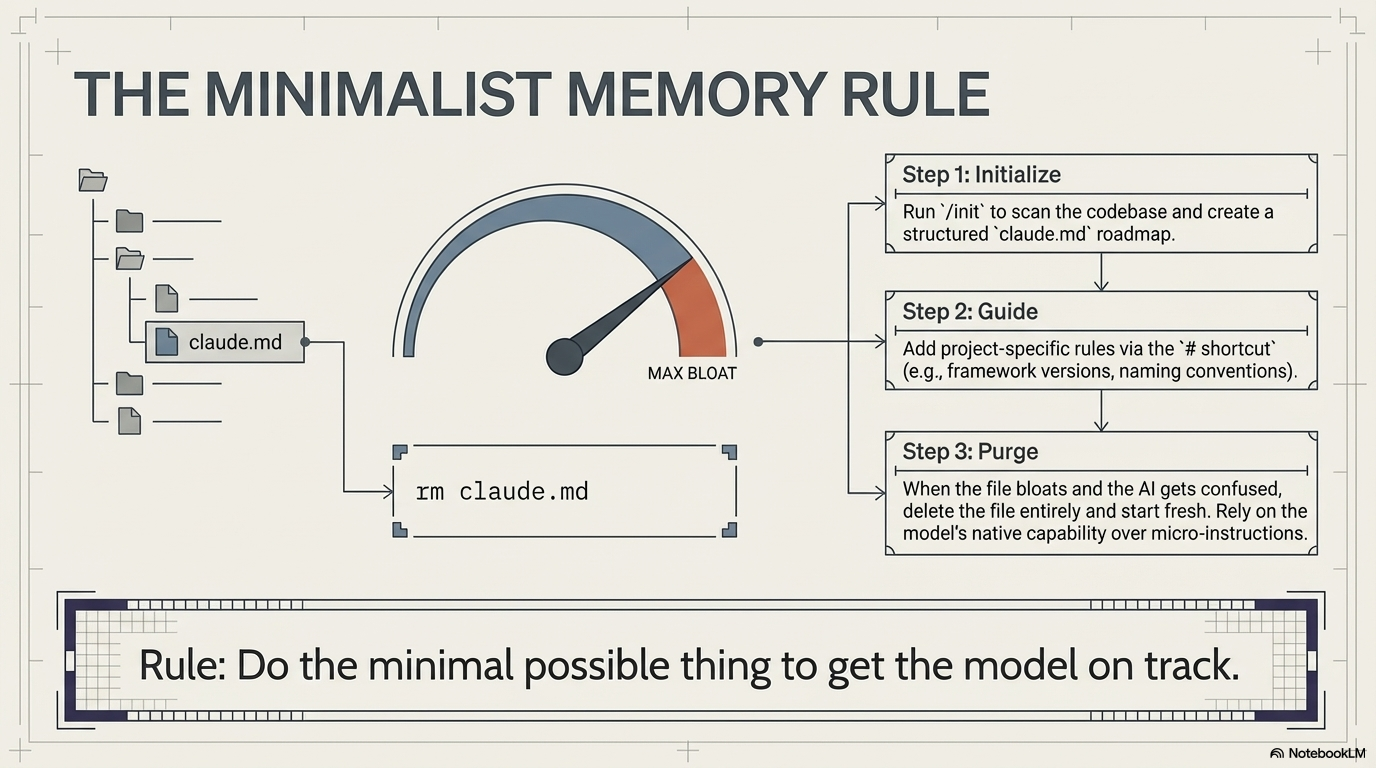
Most people assume better AI results come from giving the model more instructions. Boris’s system makes the opposite bet: give it less, but make that less count.
The rule in the image says it plainly: do the minimal possible thing to get the model on track. In practice, that starts with initialization. Run /init, let Claude scan the codebase, and generate a structured claude.md roadmap. That gives the model a basic map of the territory without burying it in noise from day one.
The next step is guidance. Add only the rules the model cannot reliably infer on its own, such as framework versions, naming conventions, or project-specific constraints. This is where most people go wrong. They keep stuffing claude.md with every reminder, preference, and edge case they can think of, until the file stops acting like useful memory and starts acting like a cluttered junk drawer.
That is why the third step matters most: purge. When the file gets bloated and the AI starts drifting, delete it and start fresh. For most engineers, this feels wrong. We are trained to preserve documentation, add more detail, and keep every rule just in case. But a model working from a short, clear set of instructions is often far more reliable than one trying to obey a long file full of overlap, leftovers, and contradictions.
That is the real lesson here: memory is only helpful when it stays clean. Once your instruction file becomes clutter, the smartest move is not to add one more rule. It is to pick up the broom.
Context Contamination: When the AI Starts Carrying Too Much Baggage
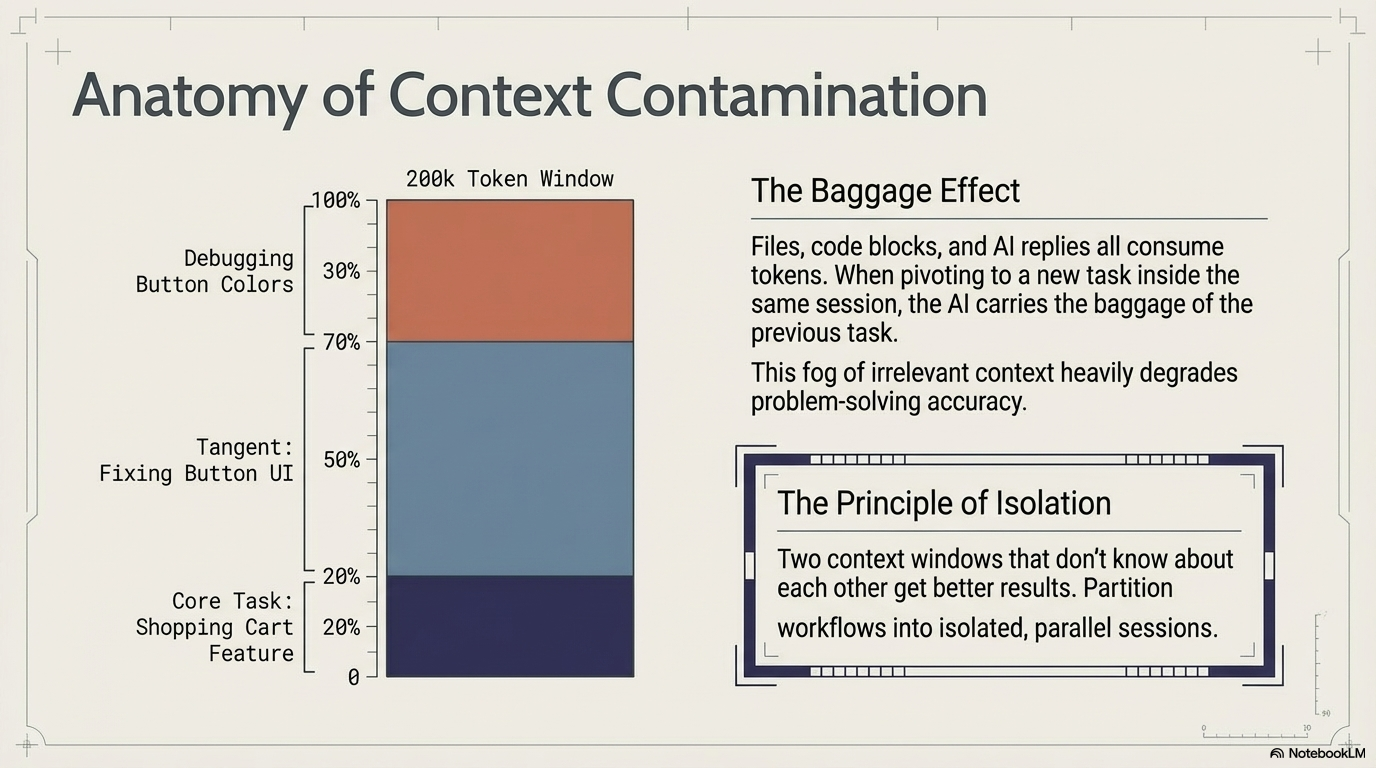
A big context window sounds impressive on paper. In real use, it fills up much faster than people expect, and once it does, the AI starts carrying around a lot of mental clutter that has nothing to do with the job in front of it.
That is what this image shows. The session begins with the real task: building a shopping cart feature. Then the work drifts. A side trip into button UI eats up a huge part of the context window. After that comes more debugging on button colors. By the time you return to the original shopping cart problem, most of the AI’s attention is no longer on the thing you actually care about. It is stuck dragging along old code, old replies, and old detours. Boris calls this the baggage effect. The more irrelevant context the model carries, the worse it gets at thinking clearly about the current task.
This is the part many users miss. They assume staying in one long chat is efficient because everything is in one place. But that convenience has a cost. The AI does not just remember the useful parts. It remembers the junk too. And once too much junk piles up, accuracy starts to slip.
The fix is simple, even if it feels unnatural at first: isolate the work. Start a fresh session for a new task. Keep unrelated problems separate. Let each thread carry only the context it actually needs. Boris’s rule is that two context windows that do not know about each other often produce better results. In plain English, the AI works better when you stop making it haul yesterday’s baggage into today’s job.
That is the real lesson here: a long chat can feel productive, but beyond a certain point it becomes a crowded room. When the task changes, open a new door.
Context Weight Management: A Good AI Session Is Not Something You Use Up. It Is Something You Clean.
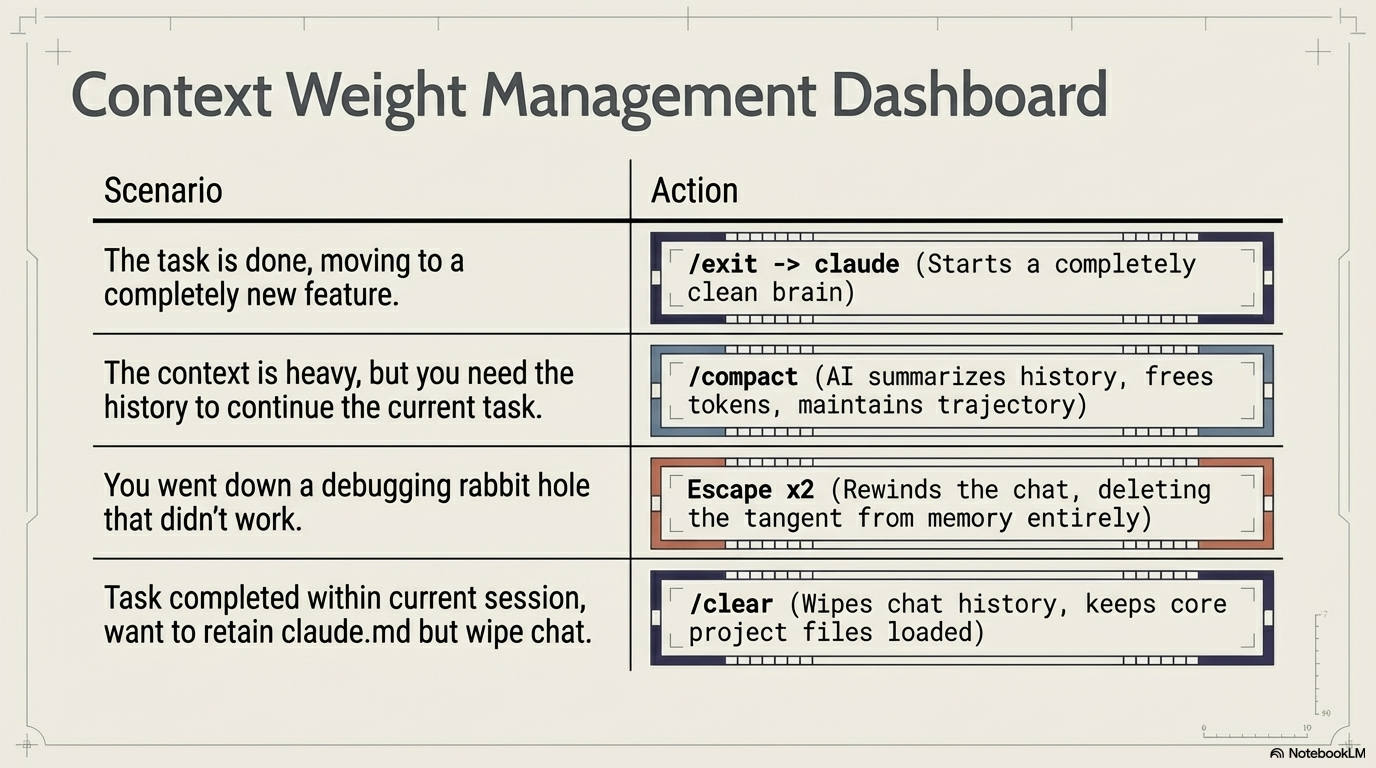
Most people treat an AI chat like a running conversation that should keep going forever. This image makes the opposite case: context is not free, and if you do not manage it, it turns into clutter.
Once you understand that, the fixes become straightforward. When one task is finished and you are moving to a completely new feature, the right move is to leave the session behind and start fresh with /exit -> claude. That gives you a clean brain instead of dragging old assumptions into new work. When the current task still matters but the session has become heavy, /compact helps by having the AI summarize the history, free up space, and keep the work moving in the same direction.
There is also the situation every developer knows too well: you disappear into a debugging rabbit hole, chase the wrong idea, and realize twenty minutes later that the detour was useless. That is where Escape x2 matters. It rewinds the chat and removes the tangent from memory, so the session is no longer polluted by a bad path. And when the task is done but you still want to keep your core project setup, /clear wipes the chat history while keeping files like claude.md loaded. In plain terms, it lets you clean the room without throwing out the furniture.
That is why these commands matter. They are not little convenience tricks. They are basic hygiene for working with AI. The people who get the best results are usually not the ones with the cleverest prompts. They are the ones who know when to reset, when to compress, and when to stop carrying yesterday’s mess into today’s work.
The 2–3x Quality Multiplier
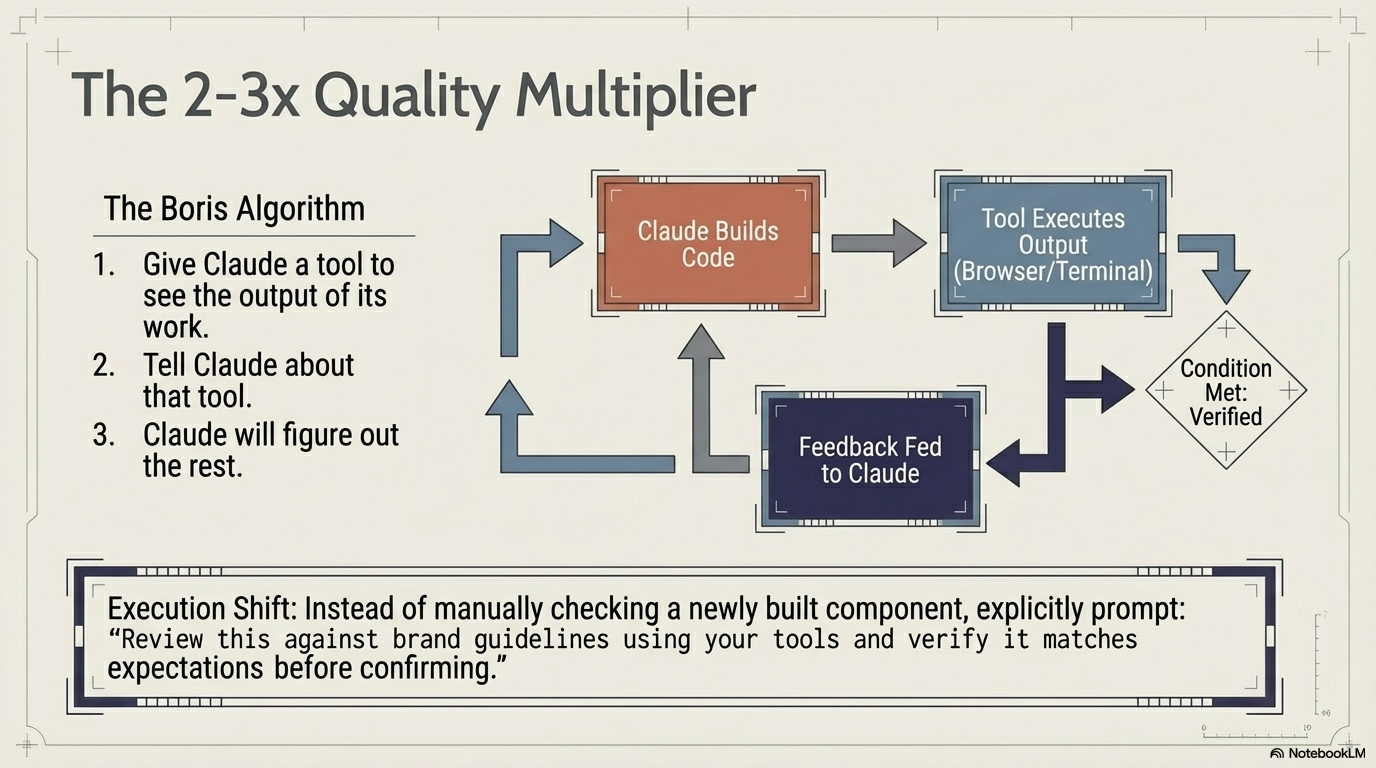
AI gets much better the moment it can check its own homework.
That is the big idea in this image, and it is surprisingly simple. Boris’s method has three parts: give Claude a tool that can see the result of its work, tell Claude that the tool exists, and let it use that feedback to improve the output. Instead of writing code once and stopping there, the model goes through a loop: build something, run it, look at what happened, and fix what is off. That is not magic. It is just feedback. And feedback is where quality comes from.
This matters because most people still use AI like a one-shot machine. They ask for a component, get an answer, and then inspect it manually. Boris changes the setup so the model can do some of that checking on its own. If the tool can open the browser, inspect the page, run the output, or verify the result in a terminal, Claude is no longer working blind. It can see whether the thing it built actually behaves the way it was supposed to behave.
That also changes how you ask. Instead of saying, “Build this component,” you say, “Build this component, then review it against the brand guidelines using your tools and verify it matches expectations before confirming.” That sounds like a small wording change, but it creates a completely different job. You are no longer asking for a draft. You are asking for a checked result.
That is why Boris calls it a quality multiplier. The jump does not come from better prompting tricks. It comes from giving the AI a way to see, test, and correct its own work before it hands it back to you. In plain English, the smartest AI is not the one that answers fastest. It is the one that knows how to look twice.
Breaking the Sandbox: When AI Stops Guessing and Starts Checking
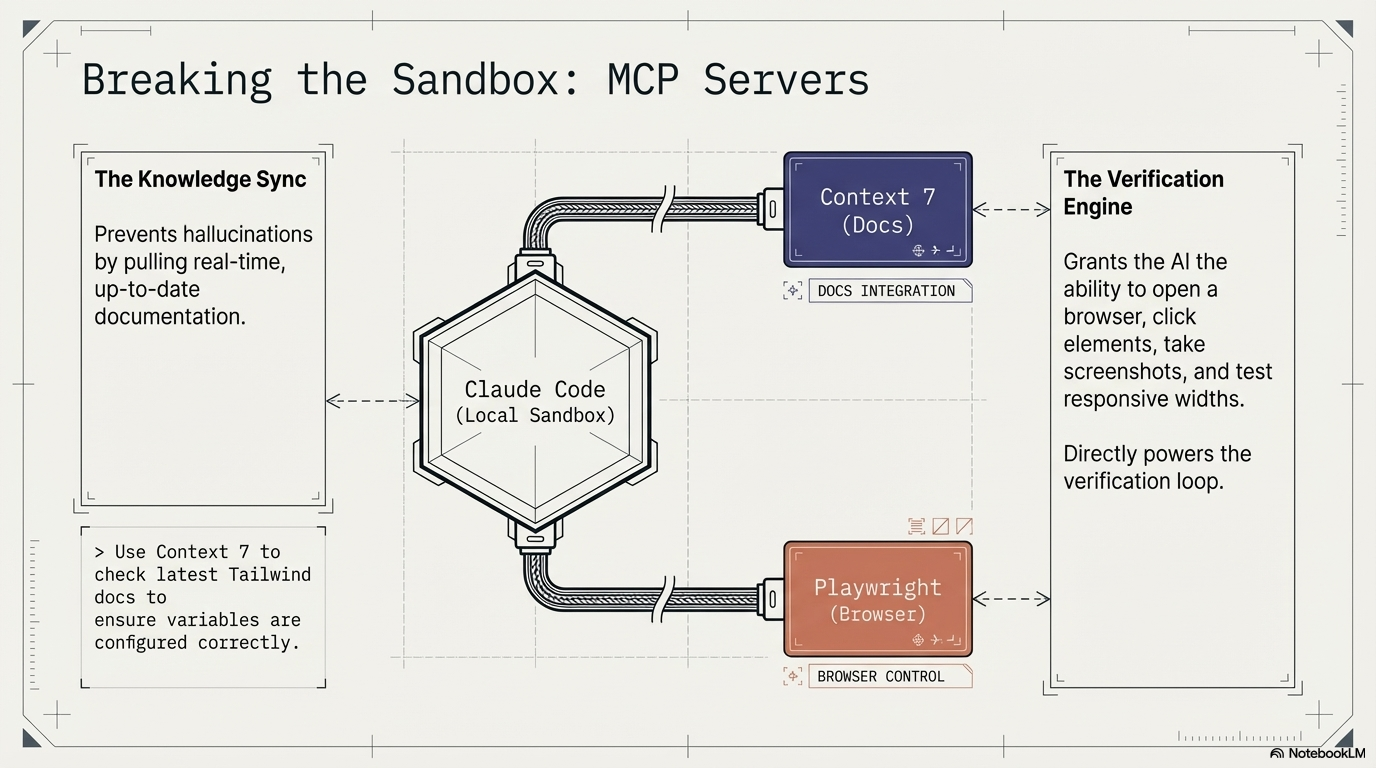
An AI working alone inside a sandbox is like a mechanic trying to fix a car with no manual and no test drive.
That is the point of this image. By default, Claude Code works inside a local box. It can read and write code, but it cannot naturally reach out to the live web, open a browser, or confirm that what it built actually works in the real world. MCP servers change that. They give the model controlled ways to step outside its box and interact with the tools it needs.
In this setup, Context 7 acts like a live knowledge feed. It pulls in current documentation so the model is not relying on stale memory or making things up when frameworks change. If you want Claude to check the latest Tailwind docs before configuring variables, Context 7 gives it that ability. Instead of guessing from old training, it can look at the source of truth.
Playwright does the other half of the job. It gives Claude eyes and hands in the browser. The model can open pages, click buttons, take screenshots, and test how the layout behaves at different screen sizes. That matters because a lot of software problems are not really code problems until you see them on the screen. With Playwright, Claude no longer has to assume the interface looks right. It can actually check.
That is why “breaking the sandbox” matters so much. One tool helps the model know what is current. The other helps it verify what is real. Put together, they turn AI from a smart guesser into something much closer to a worker who can read the manual and test the result before calling the job done.
Automating the Inner Loop: Turn Repetition Into a Button Press
The fastest way to speed up AI work is not to type better prompts every time. It is to stop repeating the same setup work in the first place.
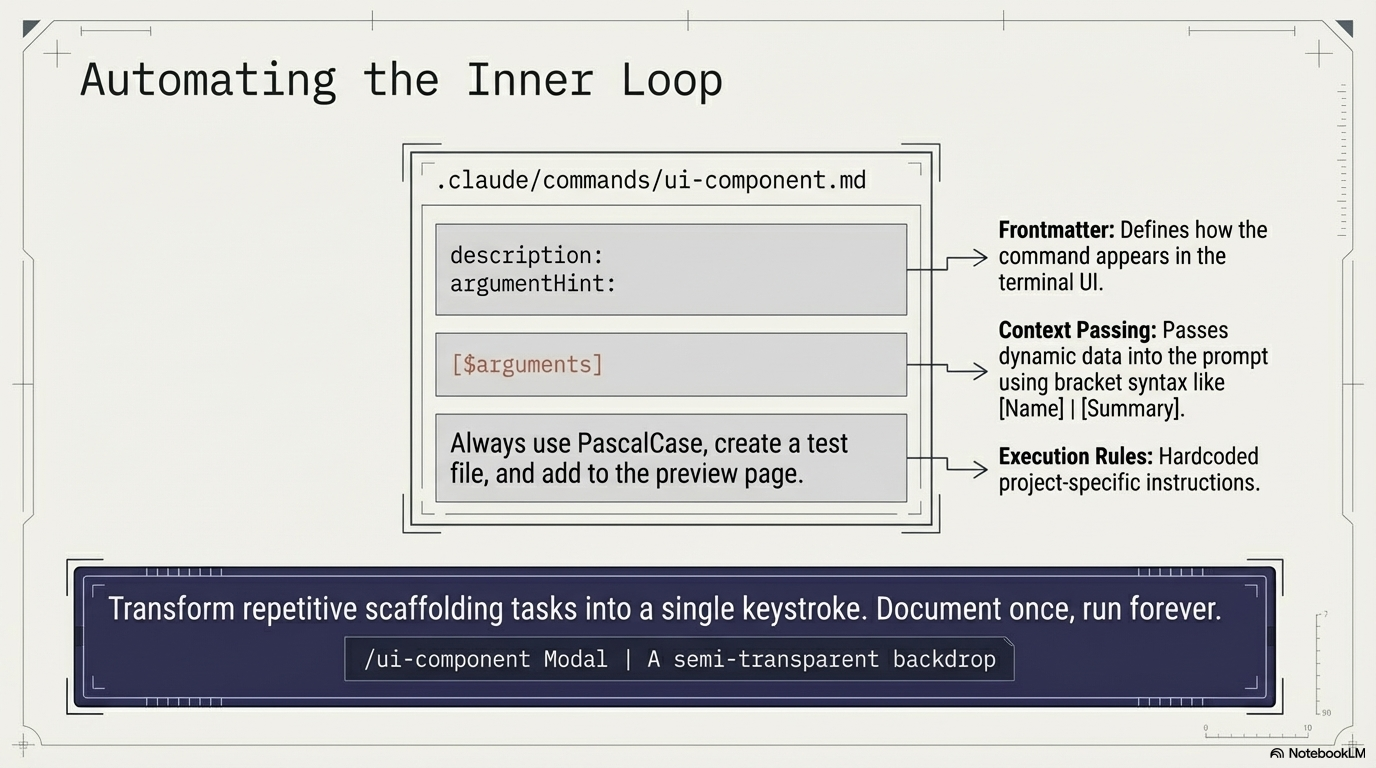
That is what this image is really about. In any real project, there are small jobs that come up again and again: create a new UI component, add the test file, register it on the preview page, follow the same naming rules, and keep the same structure every time. None of that work is hard, but it is repetitive, and repetition is exactly where good systems save time. Instead of re-explaining the same task to Claude over and over, Boris’s approach is to turn that routine into a custom command.
The command file shown here has three simple parts. First, the frontmatter tells Claude how the command should appear in the terminal. Second, the argument section lets you pass in changing details, like the name of the component or a short summary of what it should do. Third, the execution rules hold the project-specific instructions that should happen every time, such as using PascalCase, creating a test file, and adding the component to the preview page. In plain English, you are not just giving the AI a prompt. You are giving it a repeatable playbook.
That is why a command like /ui-component Modal | A semi-transparent backdrop matters. With one line, the model can scaffold the component, generate the related test file, and wire it into the project the same way every time. What used to be a handful of repeated instructions becomes a single action.
The bigger lesson is simple: whenever you catch yourself doing the same thing again and again, that is not a habit to tolerate. That is a process waiting to be turned into a tool. Write it down once, and let the system carry it from there.
The Autonomous Review Pipeline: Let One Brain Build, and Another Brain Check
A lot of AI mistakes happen for a simple reason: the same session is trying to do everything at once.
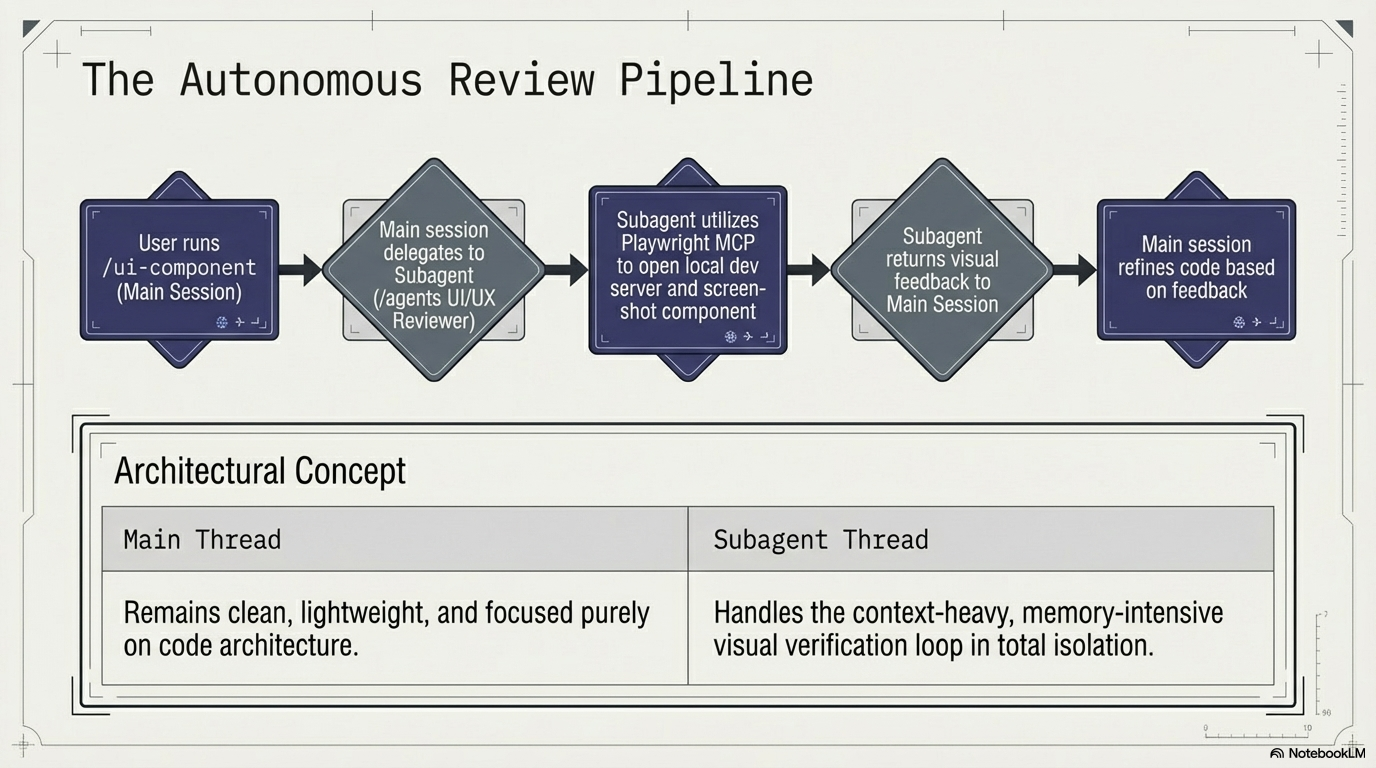
That is what this image is trying to fix. The user starts by running a custom command in the main session, but the main session does not carry the whole burden by itself. Instead, it hands off the visual review work to a separate subagent, a kind of specialist whose only job is to look at the interface and judge what is actually happening on the screen. That subagent uses Playwright MCP to open the local development server, inspect the component, take screenshots, and send visual feedback back to the main session. Then the main session uses that feedback to improve the code.
The important idea here is separation of duties. The main thread stays clean, light, and focused on structure, logic, and code decisions. The subagent handles the heavier review work, where lots of visual details, screenshots, and browser interactions can quickly clutter the context. By keeping those jobs apart, each part of the system stays better at its own role.
You can think of it like a builder and an inspector. The builder keeps building. The inspector checks the work and reports back. They help each other, but they do not need to live in the same crowded room. That separation is what keeps the process sharp.
That is the real lesson in the pipeline: AI gets more reliable when you stop forcing one conversation to be the worker, the reviewer, and the memory dump all at the same time. Keep the builder clean, keep the reviewer separate, and the whole system starts acting much more like a team than a chat.
The Bitter Lesson: Stop Polishing Prompts for a World That Is Moving Past Them
One of the easiest ways to waste time in AI is to obsess over prompt tricks that the next model will make irrelevant.
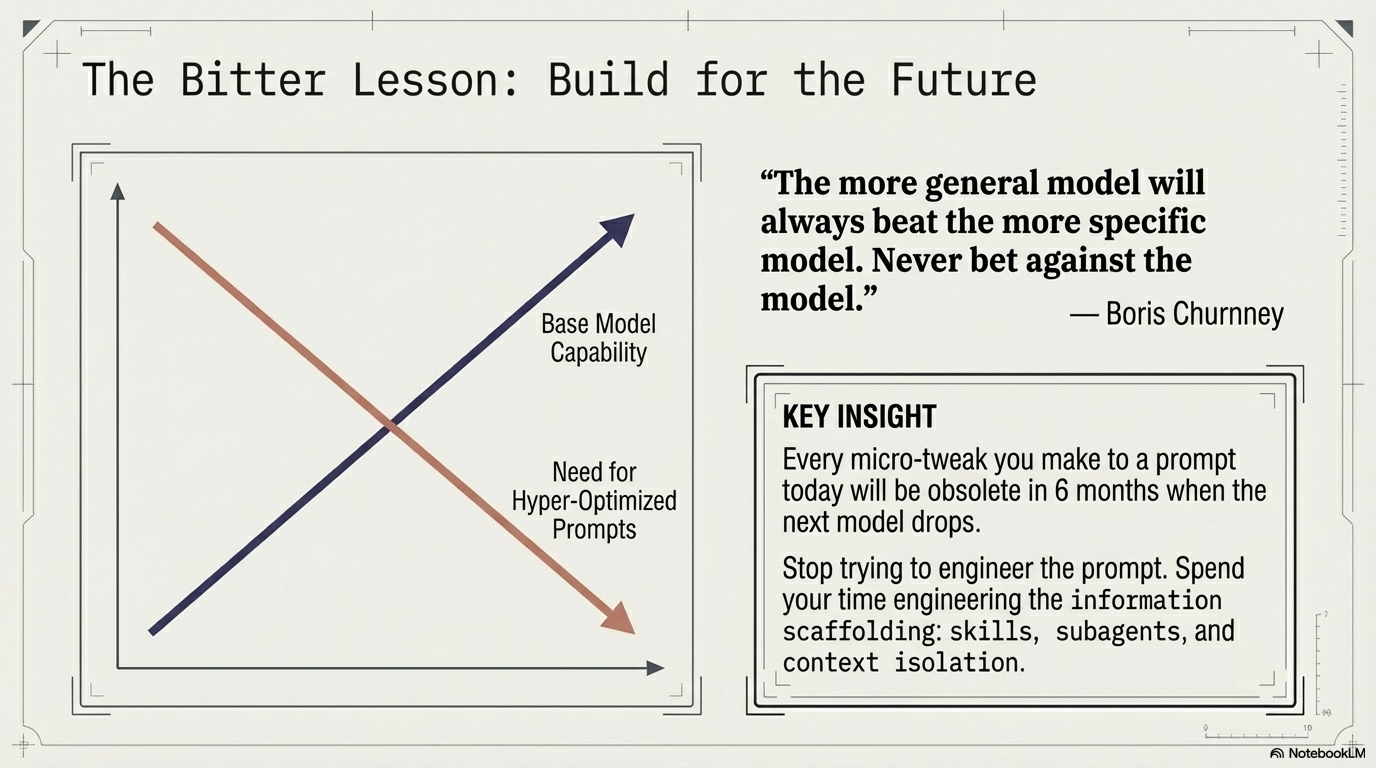
That is the point of this image. As base models get stronger, the value of hyper-specific prompt tuning goes down. Boris Cherny puts it bluntly: never bet against the model. In plain English, do not build your workflow around the assumption that today’s model will need endless hand-holding forever. What feels like a clever prompt hack right now may look useless six months from now, simply because the underlying model will have improved.
The smarter investment is in the system around the model. Instead of spending your energy squeezing tiny gains out of wording, spend it on the parts that will still matter after the next upgrade: better context, cleaner information, reusable skills, isolated subagents, and stronger verification. Those things do not disappear when the model gets better. They become even more valuable.
That is the bitter lesson here: prompts are rented, but systems are owned. Build the part that lasts.
The Orchestration Network
At the end of all this, your job is no longer to babysit an AI. Your job is to run a system.
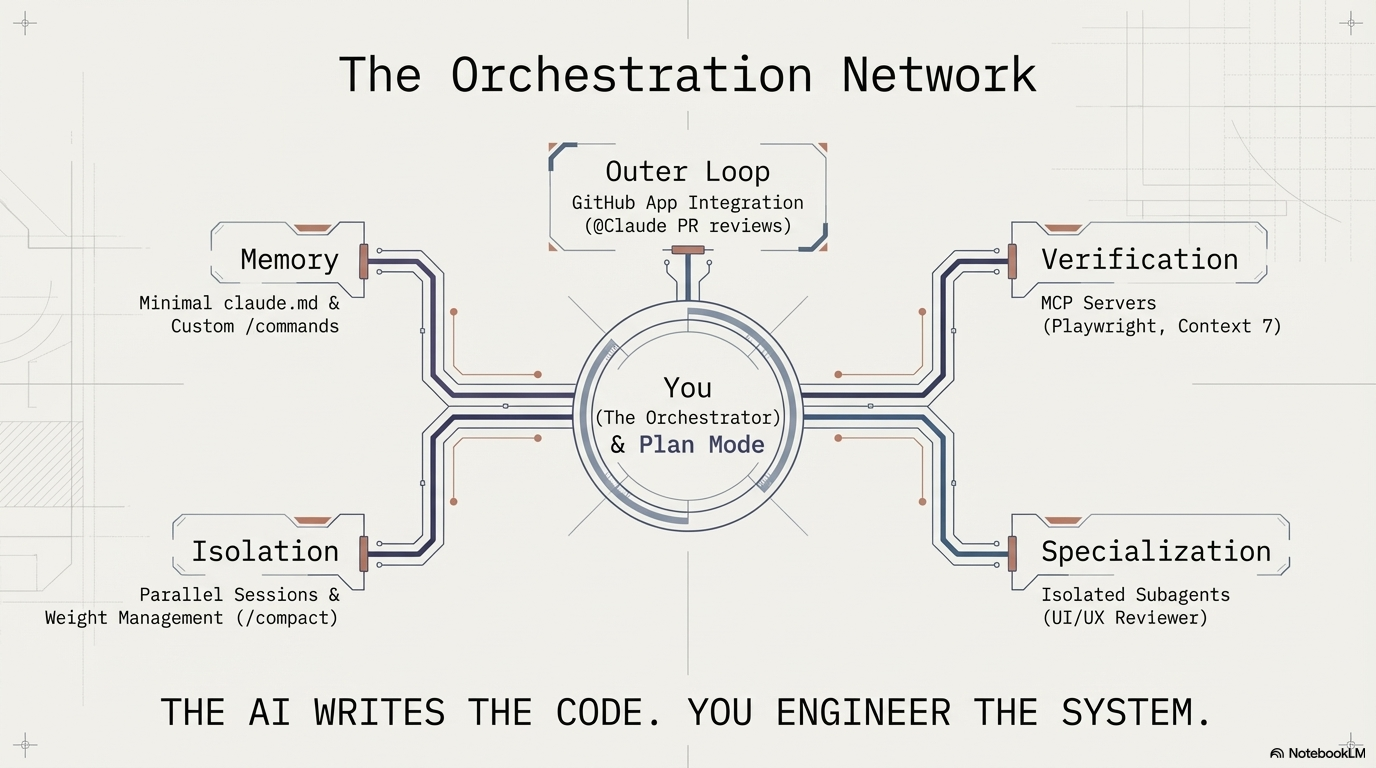
That is what this final image makes clear. You sit at the center, not as the person typing clever prompts, but as the orchestrator deciding how the whole setup works. Around you are five moving parts. Memory stays lean through a minimal claude.md file and a small set of custom commands. Isolation keeps work from bleeding into itself through parallel sessions and context management tools like /compact. Verification comes from MCP servers such as Playwright and Context 7, which let the model check documentation and test what it builds. Specialization comes from isolated subagents that handle narrow jobs, like reviewing UI and UX. And above all of it sits the outer loop, where tools like GitHub app integrations can review pull requests and keep the workflow moving beyond a single chat window.
The important shift is simple: the AI is no longer the whole show. It becomes one part of a larger machine that you design and direct. The model writes code, but you decide how memory is handled, how work is split up, how output is checked, and where specialized reviewers step in. That is the difference between casually using AI and actually engineering with it.
What to Take Away
The Boris system is not really a bag of tricks. It is a way of thinking. Its core claim is that the quality of AI-assisted work depends less on finding the perfect prompt and more on building the right environment around the model.
That means planning before building. It means keeping memory light instead of stuffing it with instructions. It means isolating tasks so one problem does not poison the next. It means giving the model tools to verify its own work instead of making the human catch everything by hand. And it means using specialized subagents when a job needs a separate set of eyes.
That is the real takeaway. Do not treat AI like a magic box that needs better words. Treat it like a system that needs better design.
In the long run, the people who win with AI will not be the ones who write the cleverest prompts. They will be the ones who build the cleanest machines around the model.
This article began with a YouTube video I watched the day before yesterday, and then watched three more times because each viewing left me more impressed than the last. I sent the video to NotebookLM and asked it to turn the ideas into a slide deck, and the quality of those visuals completely changed how I think about Claude Code. What you are reading here is my own understanding and reflection on those ideas, shaped through writing and polished with help from ChatGPT, Claude, and Gemini. That feels fitting, honestly: we are living in the age of AI, and the real lesson is not to rush for cleverness, but to think carefully, build deliberately, and remember the principle underneath all of this: move slow so you can move fast.
If you found this useful, visit MetisMesh to see what we are building in the AI space and to read more articles like this one.