January 16, 2026 · 30 minutes
Building a Live Job Search Agent with Strands, Ollama, and MCP
A step-by-step guide to building a live job-search AI agent using Strands for orchestration, Ollama for local inference, and the Model Context Protocol (MCP) to access real-time data from Dice without hardcoded APIs.
AI · Ollama · MCP · Python · Strands
Wiring Ollama, Strands-Agents, and Dice’s MCP Server into a Real AI Job Scout
What if learning AI didn’t mean watching demos—but building something that actually talks to the real world?
I was sitting on the bench between projects, doing what I usually do when I have time on my hands: writing code, reading code, and thinking about better ways to write code. Like many engineers, I spend most of my day inside an editor, and curiosity is part of the job. That curiosity led me to Dice’s newly launched MCP server. It immediately clicked—if jobs live in data, and AI understands natural language, then what better way to search for opportunities than by simply asking for them? No filters, no forms, no rigid keywords—just plain English. That simple idea turned into an experiment, and that experiment turned into this project.
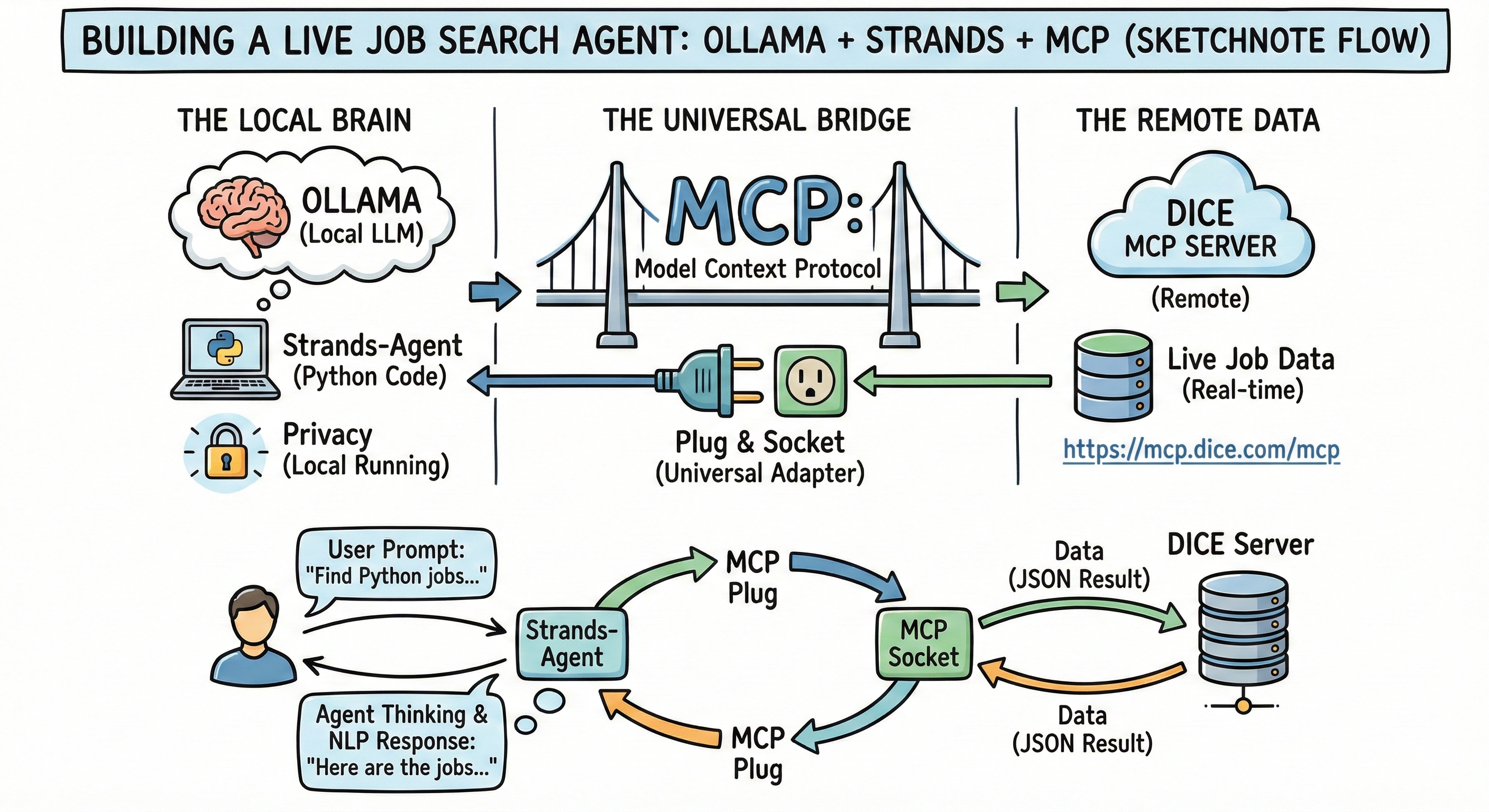
That question is what led me down an interesting path:
connecting a local LLM to a live job marketplace using a new protocol called MCP, and doing it cleanly with Strands-Agents.
By the end of this post, you will have a working AI agent that can:
- Understand natural language
- Decide when it needs external data
- Call real services without hardcoding APIs
- Search jobs from Dice’s live job repository
Let’s start with the big picture and slowly zoom in.
The Big Picture
Traditionally, software looks like this:
User → UI → Backend → Database → ResponseLarge Language Models changed one thing:
they let us talk to software using natural language.
But LLMs alone are limited.
They live in text. They do not know how to act.
They cannot:
- Fetch live data
- Call APIs
- Use tools
- Understand what they are allowed to do
That is where agents come in.
What Is an LLM (Really)?
A Large Language Model (LLM) is not a brain.
It is better described as an extremely powerful autocomplete engine.
It predicts the next most likely token based on context.
On its own, an LLM:
- Cannot browse the web
- Cannot call APIs
- Cannot know today’s job listings
- Cannot remember tools or capabilities
So how do we give it real-world power?
Agents: Giving LLMs Hands and Eyes
An agent wraps an LLM with:
- Tools
- Memory
- Decision-making logic
An agent can:
- Read your question
- Decide whether it needs external data
- Choose the right tool
- Call that tool
- Use the result to respond
This is exactly what Strands-Agents is designed to do well.
Why MCP Exists (And Why It Matters)
Before MCP, tool integration usually meant:
- Writing custom API clients
- Hardcoding JSON schemas
- Manually wiring functions
- Keeping everything in sync as APIs change
This approach does not scale.
MCP (Model Context Protocol) changes the model
With MCP:
- Servers advertise what they can do
- Clients discover tools dynamically
- Agents do not need custom glue code
A good mental model is USB for AI tools.
You plug in.
You handshake.
You start using capabilities.
Why Dice’s MCP Server Is a Big Deal
Dice runs one of the largest tech job repositories in the world.
By launching an MCP server at:
https://mcp.dice.com/mcpis explained in detailed at Dice Launches MCP Server for AI-Powered Job Search, written by Baylee Jost on Jan 12, 2026
Dice made its job search capabilities:
- Discoverable
- AI-native
- Agent-friendly
Your agent does not “call an API.”
It learns what Dice can do.
That shift is subtle, but very important.
Why Ollama?
Cloud LLMs are powerful, but they are also expensive and opaque.
Ollama gives you:
- Local execution
- No API keys
- Full privacy
- Fast iteration
In this project we use:
llama3.2:latestThis makes the entire system:
- Reproducible
- Offline-friendly
- Beginner-safe
Why Strands-Agents?
Amazon AWS’s Strands-Agents framework gives us three key things:
- A clean agent abstraction
- Native MCP support
- Pluggable LLM backends (Ollama, OpenAI, and others)
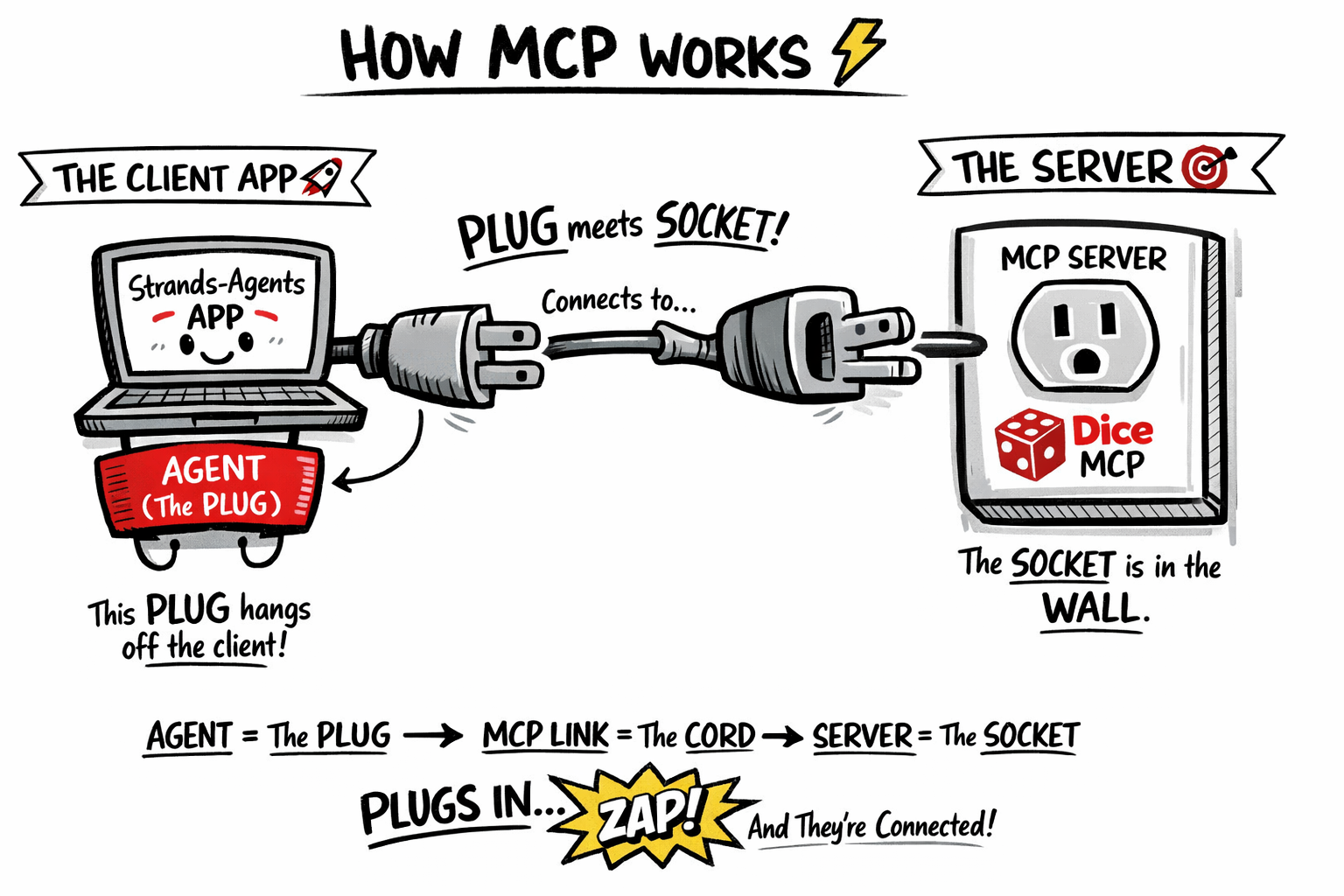
MCP in one picture:
Your Strands-Agents app is the host, and the agent carries a plug (the MCP client).
That plug connects to a wall socket (the MCP server — here, the Dice MCP server).
When the plug meets the socket, a handshake happens: the server advertises its tools, the agent learns them instantly, and power flows — not electricity, but capabilities.
No hardcoded APIs. No manual wiring. Just discover, connect, and act.
Strands lets you focus on intent, not plumbing.
Starting From Scratch (Yes, From Zero)
Step 1: Install UV (Modern Python Tooling)
curl -Ls https://astral.sh/uv/install.sh | bashUV replaces:
- pip
- venv
- requirements.txt
One tool. A much cleaner mental model.
Step 2: Create Your Project
uv init dice-agent
cd dice-agent
Open the folder in VS Code.
Step 3: Install Dependencies
uv add "strands-agents[ollama]>=1.22.0"
uv add "strands-agents-tools>=0.2.19"
That is all you need. No dependency chaos.
The Code
Create a file called main.py.
This is the complete code you will type.
from mcp.client.streamable_http import streamable_http_client
from strands import Agent
from strands.models.ollama import OllamaModel
from strands.tools.mcp.mcp_client import MCPClient


# Create an Ollama model instance (the agent's brain)
ollama_model = OllamaModel(
    host="http://localhost:11434",
    model_id="llama3.2:latest",
    temperature=0.3,
    keep_alive="10m",
    options={"top_k": 40},
)


# Create the MCP transport (the plug)
def create_dice_transport():
    return streamable_http_client("https://mcp.dice.com/mcp")


# Initialize the MCP client
dice_mcp_client = MCPClient(create_dice_transport)


# Connect, discover tools, and run the agent
with dice_mcp_client:
    # Discover Dice tools dynamically
    dice_tools = dice_mcp_client.list_tools_sync()

    # Create the agent
    job_scout_agent = Agent(
        model=ollama_model,
        tools=[dice_tools]
    )

    # Interactive loop
    print("\nDice Job Ready! Type 'exit' to quit.\n")

    while True:
        user_input = input("Question: ")

        if user_input.lower() in ["exit", "quit"]:
            break

        print("\nThinking...\n")
        response = job_scout_agent(user_input)
        print(f"Answer: {response}\n")
You did not write:
- A REST client
- A search function
- A schema definition
- A parser
Yet your agent can talk to a live job marketplace.
What You Actually Built
You did not just build a script.
You built:
- An AI agent
- Powered by a local LLM
- That dynamically discovers tools
- And connects to a live global job repository
This is what modern software looks like:
- Less glue code
- More intent
- More leverage
Final Thought
If you are from economics, computer science, or entirely self-taught, this project keeps you busy in the best possible way.
You learn by doing. You see results immediately. And you connect to real systems, not demos.