October 9, 2026 · 12 min read
Inside Claude
Thirty seats. Two guests. One last spot. Follow Claude Code from your Mac to the cloud as it plans, builds, and checks an event-planner feature.
Claude Code · Sequential Thinking · MCP · Developer Tools · Agentic AI
The workshop has thirty seats. Twenty-nine are taken. Maya and Daniel both open the event page, see one place left, and click “Reserve my seat.”
Who gets it?
If your application answers “both,” you have a problem that a nicer button will not fix.
This is a good place to meet Claude Code. Not in an abstract conversation about artificial intelligence, but at your Mac, with an ordinary feature to build and a small mistake waiting to become an awkward conversation at the door.
Let’s call the project event_planner. It already lets an organizer create an event, and guests can sign in and view its page. Today, you want to add reservations. We will follow that feature from the first prompt to a reviewed change, watching what happens locally, what travels to the cloud, and why planning needs more than a promising paragraph.
This is an illustrative working session, not a claim that the example application or its tests were run for this article.
Put the right folder on the desk
You open Terminal and move into the project:
cd event_planner
pwd
The second command prints your location, perhaps a path ending in /projects/event_planner. That is where Claude Code will start looking when you launch it. You have selected the workbench; you have not built a security fence around it.
Now you start Claude Code:
claude --model fableHere we use Fable, the model named in the diagram below, with a direct connection to Anthropic’s cloud. This assumes your account and installed version support it. You can use claude with your configured default instead, or inspect available models with /model. The mechanics we are about to follow do not depend on one model name. Model configuration
The command starts a program on your Mac. It does not put the cloud model inside your laptop.
Follow the arrows
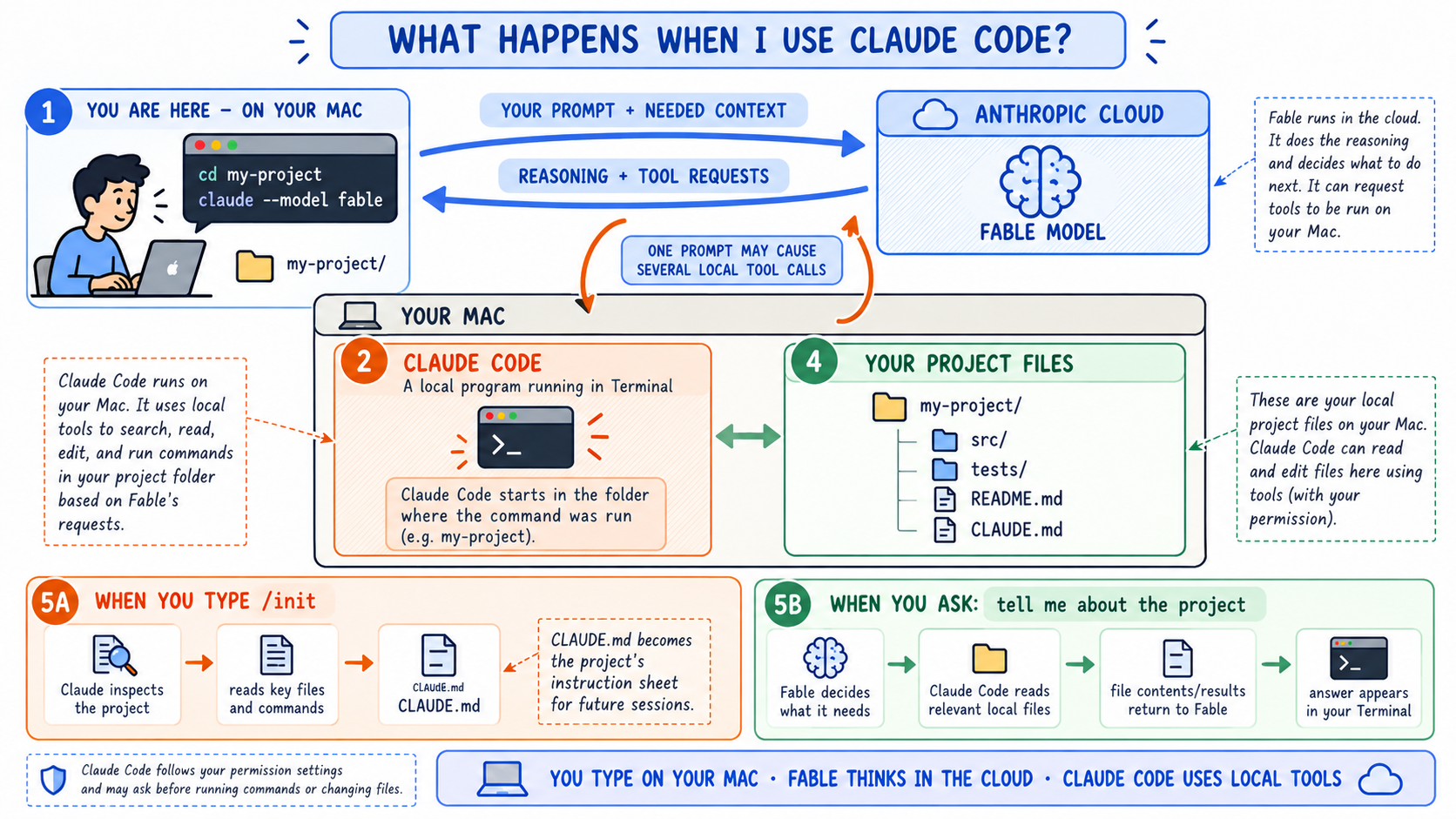
The Mac-to-cloud workflow. Read my-project as event_planner in our example. Open the original diagram at full size to inspect the labels.
Start at the left of the picture. You type a request. Claude Code sends it, with relevant context, to the model. The model can answer, or request a tool operation. Claude Code handles that request under the permissions you have configured, then returns the result. Another request may follow.
The orange box is the local program. The green box is your project. The blue cloud is the model. Keeping those three apart explains most of what otherwise feels mysterious.
Suppose you ask, “Where does this application save an event?” The model does not reach across the internet and rummage through your Mac. It can request a search. Claude Code runs the permitted local search, returns the matches, and may then read the relevant file. The answer develops from those results.
One press of Enter can therefore produce several tool calls: search, read, inspect, and answer. A turn is your request and the work that follows it; a tool call is one operation within that work. The diagram’s returning arrow represents responses and tool requests, not a promise that you see the model’s complete private reasoning. How Claude Code works
There is an important catch in the outward arrow. Your original files remain on disk, but contents read for the task and command results can become part of the context sent to the cloud. “Runs locally” does not mean “all data stays local.” Use sample guests for development, keep secrets out of prompts and logs, and check the terms and controls for your provider and account. Data usage
Leave instructions for the next visit
Before adding reservations, you want Claude to understand the project. If it lacks a useful project guide, you enter:
/initLook at panel 5A of the diagram. Claude inspects the project and helps create or improve CLAUDE.md, a guide for future sessions. It might examine the README, build scripts, source directories, and test setup. It is not installing the application or initializing Git.
For event_planner, useful instructions might identify the existing event service, record the commands that actually run the tests, and say that all reservation changes need a capacity test. You review those instructions before trusting them. A guessed build command is still a guessed build command, even in a tidy Markdown file.
Applicable CLAUDE.md files in the working directory and its parents load when the session starts; more specific instructions can load as Claude reaches subdirectories. These are working instructions, not an access-control system. Project memory and /init
Now panel 5B becomes practical. You ask Claude to explain the existing event flow. It reads the relevant files and reports what is already there. Only then do you ask it to extend that flow.
Ask for a plan before asking for code
“Add RSVPs” sounds clear until someone asks whether guests can reserve twice, whether a full event has a waiting list, or whether a reservation sends an email.
For this round, you decide: one reservation per signed-in guest, a fixed capacity of thirty, no waiting list, no cancellation, and no email. A successful reservation must survive a page refresh. A full event must say so plainly. Two simultaneous requests must never create a thirty-first reservation.
Those decisions do more for the feature than a longer prompt full of adjectives.
Now bring in /sequential-thinking. There are two pieces to distinguish. A skill is a reusable set of instructions for Claude. An MCP server is a connected program exposing tools Claude Code can call; MCP stands for Model Context Protocol. A skill can tell Claude when and how to use such a tool. It is not the tool itself.
For this example, assume you have installed a skill exposed as /sequential-thinking and connected the Sequential Thinking MCP server. The slash command is not a universal built-in command, and installing the server alone does not create that skill. Plugin commands may also have a namespace; use the name shown in your installed skill list. Check /mcp for the server connection. Claude Code skills and MCP connections describe the two mechanisms.
With that setup, your request can be quite direct:
/sequential-thinking
Plan RSVP reservations for event_planner.
Use the existing event pages and sign-in flow.
One reservation per guest; never exceed event capacity.
Exclude waiting lists, cancellations, and email for now.
Break the work into milestones and vertical slices.
Define the evidence required to pass each gate.
Save the agreed plan in docs/rsvp-plan.md.
Do not implement until I approve the plan.
That last sentence establishes a review point. It is an instruction to follow, not a technical lock; permission settings provide a separate control over what tools may do.
What Sequential Thinking adds—and what it does not
The Sequential Thinking MCP server supports numbered steps, revisions, branches, and an adjustable estimate of how many steps remain. Claude can use it to break up a problem, reconsider an assumption, or compare alternatives before presenting a plan.
It is not another model thinking independently beside Claude. The model supplies the step content; the server records structured entries and returns bookkeeping information. Nor does the server create milestones, enforce gates, or run your tests for you. Those are parts of the working method you have requested. The implementation makes that boundary worth noticing.
In our session, the useful result is not a performance of thinking aloud. It is a short plan you can challenge: what behavior will change, which assumptions need checking, what could fail, and how you will know the work is ready. Here is the kind of planning summary you should expect, rather than a transcript of private reasoning.
Claude first inspects the existing event and sign-in code. It identifies where reservations should fit. It calls out the last-seat race and compares ways to protect the write. It then proposes a small sequence of changes, with tests attached to each one.
If inspection reveals that the project already has a safe reservation mechanism, the plan should use it. If it reveals no suitable mechanism, the plan must include one. The value lies in revising the proposal when evidence changes, not in insisting on the first answer.
Milestones give the work a destination
A milestone is a meaningful result you can review. “Write some backend code” is activity. “A signed-in guest can reserve one available seat without overbooking” is a result.
For our feature, three milestones are enough.
Milestone 1: Agree on the reservation contract. The plan names the guest journey, the excluded features, the files likely to change, and the failure cases. Its gate is your review: do these rules describe the feature you want? No implementation begins until the answer is yes.
Milestone 2: Make the complete RSVP journey work. A guest reserves a seat, sees confirmation, and still sees that reservation after refreshing. Duplicate requests and full events behave correctly. Its gate requires automated checks of those rules, including simultaneous attempts at the last seat, plus a working browser demonstration.
Milestone 3: Make the change ready to release. The existing checks pass, the change is reviewed, and the release notes explain any storage change and how to recover if deployment fails. Its gate includes the designated reviewer’s approval. A successful local demonstration is not permission to publish to production.
The milestones keep the destination visible. Gates stop “nearly finished” from quietly becoming “finished.”
A gate asks for proof
A gate is a condition that must be satisfied before work moves forward. A useful gate names both the evidence and who or what evaluates it.
For the last-seat rule, “Claude says it is safe” is not evidence. A test that starts two reservation attempts with twenty-nine seats taken and verifies exactly one new reservation is much better. A review of the write path matters too: a passing test can miss an unsafe design if it never exercises the dangerous timing.
Write the rule in the plan, then put the automated checks in the project’s test and continuous-integration workflow. Configure required checks and review controls where the team needs an enforced stop. A heading called “Gate” in a Markdown file cannot block a merge by itself.
Not every gate is a test. You decide whether “Event full” is an acceptable experience without a waiting list. A reviewer decides whether the change is understandable and appropriately scoped. The machine can supply evidence without inheriting every decision.
Slices make the next step small enough to finish
A milestone can still be too large for one comfortable change. That is where a slice helps: a small piece of behavior that runs through the relevant layers and can be demonstrated.
A database table alone is not a guest experience. Neither is a button that calls an unfinished endpoint. A vertical slice connects the interface, server behavior, storage, and checks needed for one useful result.
Within Milestone 2, we choose three slices:
- Reserve an available seat. A signed-in guest clicks, the server records the reservation, and the page shows confirmation that survives refresh.
- Handle a repeat request. Clicking twice or retrying after a slow response leaves one reservation, not two, and returns a clear result.
- Protect the final seat. Competing requests cannot exceed capacity; the unsuccessful guest sees “Event full.”
Each slice includes its own tests and review. The early slices are development checkpoints, not permission to release an incomplete booking system. Milestone 2 stays behind its gate until all three work together.
The relationship is simple: a milestone defines the outcome; slices divide the work; a gate defines the evidence needed to proceed.
One round: build it, break it, repair it
You approve the plan. Claude Code writes the agreed decisions to docs/rsvp-plan.md, and you ask it to implement the first slice. That file is an ordinary project artifact, not permanent memory supplied by the MCP server. In a later session, ask Claude to read it again.
Now the same arrows in the diagram carry a different kind of work. The model requests the event-page code and the server handler. Local tools read them. The model proposes edits. Claude Code applies permitted changes to real files on your Mac, then runs the project’s actual test commands.
Maya clicks “Reserve my seat” in the development app. Confirmation appears. You refresh. It remains. The first slice has something to show, not merely something to describe.
The next slice handles a second click and a network retry. Those requests must resolve to the same guest’s reservation without consuming another seat. Claude adds the behavior and checks that it also works when the requests arrive together. Disabling a button is helpful presentation, but the server still has to protect the rule.
Then comes the third slice. There are twenty-nine reservations. Maya and Daniel each ask for the remaining seat.
Suppose the first implementation checks the count and then saves a reservation as two unprotected operations. Both requests can read twenty-nine before either saves. Each concludes there is room. Both succeed.
The test exposes the problem. An illustrative result might read:
FAIL: concurrent requests for the final seat
Expected confirmed reservations: 30
Actual confirmed reservations:   31
Milestone 2 gate: blocked
This is where planning earns its place. Claude must not remove the test, weaken the expectation, or call the extra reservation an edge case to fix later. It should report the failed gate, inspect the write path, and revise the implementation plan if necessary.
Sequential Thinking can help organize that revision: the earlier assumption about separate count-and-save operations was insufficient. The updated design must protect the capacity decision and reservation write as one coordinated operation. Exactly how depends on the storage system; a transaction alone is not enough unless its locking or isolation behavior actually protects this rule. Uniqueness for a guest and event is a separate requirement from capacity.
Claude Code makes the permitted repair locally and runs the checks again. This time, one guest gets the seat and the other gets “Event full.” The repeated-request test still leaves one reservation per guest. The ordinary booking and refresh checks still pass.
Return to the picture for a moment. The failing output traveled to the model. The revised edit traveled back as a tool request. The next test ran on your Mac. What looked like one assistant fixing a bug was a series of exchanges, each informed by the result of the last.
Finish with evidence, not applause
A useful completion report says what changed, which checks ran, what passed, and what remains untested. It links the changed files and identifies anything that still needs a human decision.
For this example, you want to see evidence for ordinary booking, persistence after refresh, repeated requests, a full event, and competing requests for the last seat. You also want the existing project checks, not just the new tests. The report should distinguish “ready for review” from “released.”
If the test database was unavailable, the honest report says the test was not run. If a browser check was skipped, it stays open. A gate does not pass because an explanation sounds confident.
Only after the release gate is satisfied does the authorized deployment workflow take over. Planning, implementation, verification, and release belong in the same story, but they are not interchangeable achievements.
Your Mac is still your Mac
All this activity uses real files and tools. A skill does not grant unlimited access, and a thoughtful plan does not make a destructive command harmless.
Use /permissions to inspect Claude Code’s controls. Allow rules permit matching operations without manual approval, ask rules require confirmation, and deny rules block them. The active permission mode and managed settings also affect what happens. Permission rules
Sandboxing is a different question: what can a command reach once it runs? Claude Code supports a sandbox for shell commands on macOS, configurable with /sandbox. It can restrict filesystem and network access, but it does not turn your project into a disposable pretend computer. Permitted edits still change real files. Built-in file tools and connected MCP integrations have separate access considerations. Sandbox scope
In this walkthrough, the model runs in the cloud and the project tools run on your Mac. An MCP server can be local or remote depending on its configuration. Wherever you put it, check its access rather than assuming it shares every boundary of the shell sandbox.
Back at the workshop door
The feature began as “add RSVPs.” It became an agreed set of rules, three milestones, a handful of slices, and gates backed by evidence. One of those gates caught a bug before a guest had to discover it for you.
That is the useful way to understand Claude Code. It is not a model living inside your project folder, and a planning skill is not a guarantee of sound engineering. It is a local program coordinating a conversation with a model and carrying out permitted work through tools. You supply the purpose, the boundaries, and the standard of proof.
The diagram gives you the map. The reservation gives the arrows a job.
At the end, there are thirty guests and thirty chairs. The important result is not that Claude wrote code quickly. It is that you can explain why the thirty-first reservation was refused—and point to the checks that support the answer.
For the next part of the picture—what a session keeps, what context contains, and what carries into a later conversation—see Claude Code Sessions vs. Context.